Playlist2vec: A Raspberry-Pi Powered Vector Search System - 1
Demo app built on Raspberry Pi for the sequence-to-sequence model described in the post “Building Music Playlists Recommendation System”
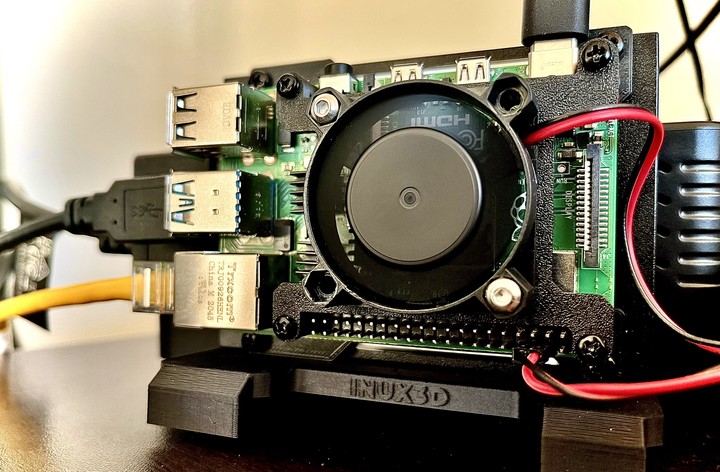
Disclaimer 1: The design choices mentioned in this article are made keeping in mind a low-cost setup. As a result, some of the design choices may not be the most straightforward ones.
Disclaimer 2: You can explore the vector search application, playlist2vec, here: https://playlist2vec.com/. You can find the code for the demo application here.
Introduction
In 2019, we published a paper titled "Representation, Exploration, and Recommendation of Music Playlists." In this work, we utilized sequence-to-sequence models to create playlist embeddings, which can be employed for various downstream tasks like search and discovery. You can see these embeddings in action at playlist2vec.com. The purpose of this post is to explain how we built Playlist2Vec, a playlist search application powered by the embeddings mentioned earlier.
Main Features
The main features of the app are:
- A search box with typeahead search where users can enter the item's name they are looking for.
- After selecting their preferred playlist name and submitting it, the system will display playlists similar to the one queried.
- The app provides Spotify URLs for the items, allowing users to navigate to them from the results page easily.
Design Considerations
- The typeahead search must be instantaneous.
- The vector search should be capable of completing in under 2 seconds on a low-cost machine, like a Raspberry Pi, under normal traffic load.
- Both vector and full-text search should be deployable onto a single machine with 4GB of RAM.
Developer Friendly Outline
We primarily wanted a setup with a lower footprint but still scalable if needed. So, we designed our system using a microservice architecture so that the system components are decoupled from each other and can be horizontally scaled independently. With that in consideration, our tech stack looks like this for the app:
- NodeJS (ExpressJS) webserver
- FastAPI for building two of our APIs; one is the search API for vector search, and the second is the autocomplete API for the typeahead search.
- USearch Vector Search Library for vector search. Given a query playlist, similar playlists are found from a corpus of 745,543 playlists using vector search. This particular library was chosen because of its speed and mmap* support.
- Fast Autocomplete Python library, a Directed Word Graph-based library for the typeahead search.
- SQLite database to store additional details for playlists such as Spotify ID, name, and cover image link. This specific database is for its portability and a smaller footprint.
- Docker containers to run the APIs and the webserver to facilitate horizontal scaleup
- Nginx, as a reverse proxy for our setup, so that features such as caching, rate limiting, etc., do not have to be baked into the code. Configured to be installed on the host machine instead of running as a docker container**.
Overall System Design
Here's how the workflow looks like:
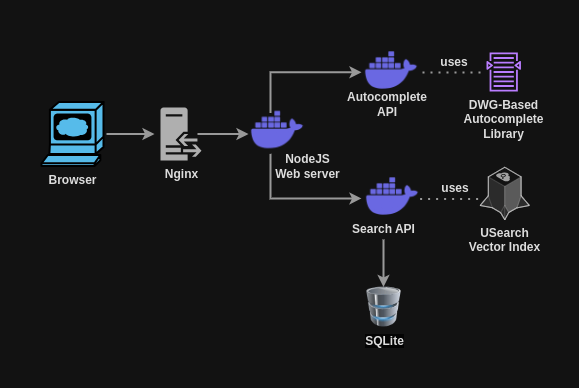
Playlist2vec design architecture. Scalable microservice-based architecture with NodeJS webserver, FastAPI-based vector search and autocomplete APIs, and Nginx as a reverse proxy.
- When you begin typing the item you want to search for, Nginx will return a cached response if one is available.
- If there is no cached response, the request is forwarded to the web server, which then sends it to the autocomplete API. The API returns a list of suggested item names and their corresponding IDs.
- Once the user selects an item from the list, the ID is sent to the web server, which forwards it to the search API. The USearch vector index retrieves the k-closest results.
- Additional details about these closest results, such as the playlist name, ID, and the cover image link, are then fetched from the SQLite database and returned to the browser.
Thoughts
The Good
Scalable architecture
Using Docker containers to hold our system modules (web server, search, and autocomplete APIs) makes it easy to scale the setup if needed.
Memory friendly setup
We chose SQLite as our database and USearch as our vector search library due to their lower memory footprint and MMAP-based implementation. Since this system is read-only, we do not require the concurrency features offered by enterprise databases like MySQL or PostgreSQL. Regarding vector search, the mmap support allows us to avoid loading the vector search index into memory, which helps conserve system RAM. While the performance may not match memory-based alternatives, it is sufficient for our needs.
Robust traffic support by using Nginx
Using Nginx enables robust support for traffic management, whether it is rate limiting to prevent any DDOS attacks (or even any volume of traffic which are beyond what our application can handle), caching (to have efficient utilization of system resources), or the rendering of static resources such as images, CSS, JS files, etc.
The Bad
Autocomplete Memory Consumption
The memory consumption of the autocomplete API can be pretty high under heavy load. Considering mmap-based alternatives may be beneficial in this case.
No HTTPS support
The v1.0.0 setup doesn't support HTTPS, so the setup requires something like a Cloudflare tunnel for HTTPS support.
Additionally, there is no built-in HTTPS support for the search and autocomplete APIs. The Node.js web server communicates directly with the API containers without a proxy in place to manage SSL or other networking rules. This means that all traffic between the web server and the APIs is unencrypted.
No (Auto)scaling (Yet)
Although the application has been designed to support scaling, the current version, v.1.0.0, still requires a scaling configuration, either Kubernates-based or another approach.
Conclusion
We designed a playlist search application powered by the embeddings from the sequence-to-sequence model we described in our paper. The setup is low-cost, enabling it to be deployed on a Raspberry Pi while still being designed to be scalable if needed. This version does depend on an HTTPS frontend (such as a Cloudflare tunnel) and does not yet have any scaling configuration.
Until the next iteration.
Notes
*Memory-mapped I/O (mmap) is a technique that allows a file or a portion of a file to be directly mapped into the memory address space of a process. This enables applications to access the file's contents as though they were part of the program's memory, facilitating efficient file input/output (I/O) operations.
**While Nginx could also have been installed as a docker container, we decided to run it on the host machine itself so as not to depend on the docker running itself, which can be used to show a maintenance page during any docker upgrades.

Piyush Papreja
Software Developer
My research interests include music information retrieval, recommendation systems and web.