Playlist2vec: DIY Autoscaler For Docker Swarm - 2
Experiments with (auto)scaling for the demo app on Raspberry Pi built for the vector-based retrieval system described in the post “Building Music Playlists Recommendation System.”
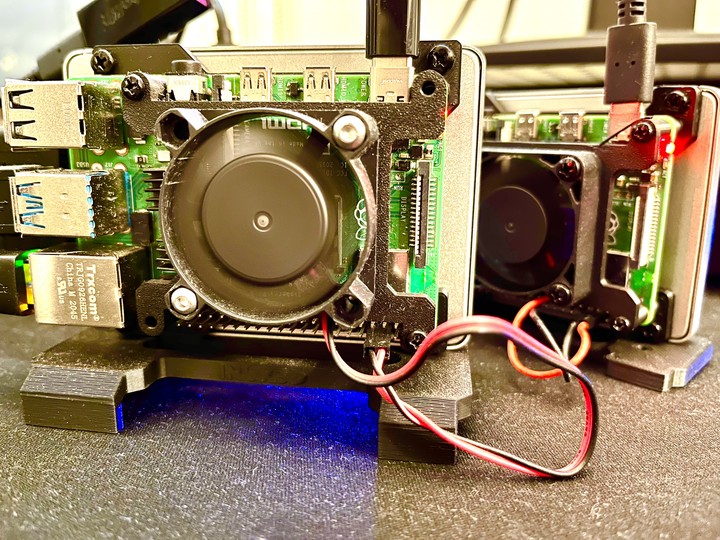
Disclaimer 1: This post continues the last post about building a playlist search and discovery application on a Raspberry Pi powered by the sequence-to-sequence model described in the post "Building Music Playlists Recommendation System."
Disclaimer 2: The design choices mentioned in this article are made keeping in mind a low-cost setup. As a result, some of the design choices may not be the most straightforward.
Disclaimer 3: You can explore the vector search application, playlist2vec, here: https://playlist2vec.com/. You can find the code for the demo application here.
Brief Summary
In the initial setup for our vector search application, we had a NodeJS (Express JS) web server and FastAPI microservices for autocomplete and vector search features. All three are deployed as docker containers for ease of installation and scalability. We use the USearch vector search library for vector search, and for autocomplete, we use a Python-based Directed Word Graph library called fast-autocomplete. The entire setup is behind Nginx, which acts as a reverse proxy for our setup.
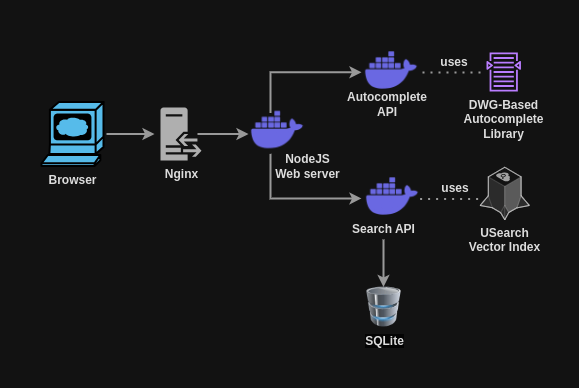
Playlist2vec design architecture. Scalable microservice-based architecture with NodeJS webserver, FastAPI-based vector search and autocomplete APIs, and Nginx as a reverse proxy.
Limitations
Despite support for these within our setup, there was no actual HTTPS or scaling implementation. In this post, we will focus on adding scaling capability to our application using Docker Swarm.
Docker Swarm: From Containers To Services
Docker Swarm enables the deployment and management of multiple instances of applications, ensuring high availability and resilience. The key distinction between deploying an application in swarm mode and using conventional Docker Compose lies in the added abstraction of services.
Containers are units of deployment which have their runtime. They encapsulate an application and its dependencies, including libraries, binaries, and configuration files, into a single, lightweight package. Each container runs in isolation from others, sharing the host operating system's kernel but maintaining its filesystem, processes, and network stack.
On the other hand, services represent a higher-level abstraction that defines how a specific application or a set of related applications should run in a container orchestration platform like Docker Swarm or Kubernetes. A service specifies the desired state for a group of containers, including the number of replicas (instances) to run, the networking configuration, and the load-balancing strategy. When you create a service, the orchestration platform automatically manages the deployment and scaling of the underlying containers to meet the defined specifications.
Scaling Up The Setup
Before transitioning to a Docker Swarm setup, we take the following steps to incorporate scaling into our configuration:
- Add an additional Raspberry Pi to our machine cluster, ensuring that both machines can communicate with each other.
- Modify the vector search implementation to be memory-based, moving away from the previous MMAP-based. This change allows us to better understand the resource requirements associated with scaling.
Docker Swarm Config
Here’s a snippet of the docker-compose.yaml file for one of the services, autocomplete-service:
autocomplete-service:
    build: ./autocomplete-service
    image: ${REGISTRY_HOST}:${REGISTRY_PORT}/autocomplete-image:latest
    networks:
      - p2v-network
    env_file:
      - .env
    deploy:
      replicas: 2
When the docker stack is deployed, this configuration scales the autocomplete-service to run multiple instances (2 in this case). This setup enables the service to handle significantly more traffic compared to a single-instance configuration, enhancing its ability to manage increased load effectively.
Autoscaling
Autoscaling is a cloud computing feature that automatically adjusts a service's number of active instances based on current demand. This ensures optimal resource utilization, maintains performance, and minimizes costs by dynamically scaling resources up or down in response to varying workloads.
The core concept of an autoscaler is to define conditions that trigger scaling actions. Common criteria for scaling include CPU usage, memory consumption, or the number of requests indicative of traffic load.
An autoscaler can operate in two primary ways:
- Event-Driven Scaling: Scaling actions are triggered by specific events, such as a sudden spike in traffic.
- Polling-Based Scaling: A service continuously monitors a metric and initiates scaling actions when that metric crosses a defined threshold.
Docker Swarm does not natively support autoscaling capabilities, unlike Kubernetes, which offers robust autoscaling features. However, it is possible to implement a basic autoscaling solution within an existing Docker Swarm setup.
DIY Autoscaling
In this implementation, we focus on the number of requests within a specific timeframe as the primary condition for autoscaling. We use Nginx's access.log as our primary source of information for the requests logged.
Our approach employs a polling mechanism with a 15-second interval. A bash script runs every 15 seconds to:
- Retrieve each endpoint's total number of requests within the last 15 seconds by using awk.
- Determine the required number of replicas based on the request count based on our custom logic, implementing load-based scaling.
- Execute the
docker service scalecommand to adjust the number of replicas horizontally, effectively increasing or decreasing the number of service instances.
Here's a snippet of code as an example to get the total request count for an endpoint from the Nginx logs:
awk -v start="$(date --date='15 seconds ago' '+%d/%b/%Y:%H:%M:%S')" \
    -v end="$(date '+%d/%b/%Y:%H:%M:%S')" \
    '$4 >= "["start"]" && $4 <= "["end"]" && $7 ~ /\/populate/ {count++} \
    END {}' /var/log/nginx.log
To establish the relationship between the number of requests and the required replicas, we conduct load testing on our services using the load testing tool k6. By performing constant-rate arrival tests, we identify the maximum requests a single Docker instance can handle for each service on our specific hardware. This data informs our autoscaling setup, ensuring we can effectively manage resource allocation in response to varying traffic demands.
// Autoscaling Pseudocode

// Read request counts from the Nginx access log for each endpoint
request_counts = read_log_parser_output()

// Determine the required number of service replicas based on
// request counts based on our custom logic and prior load testing
required_service_replicas_lookup = get_scale(request_counts)

// Execute scaling commands for each service
FOR EACH service, replicas IN required_service_replicas_lookup:
    scale_service(service, replicas)
Thoughts
The Good
Low-Cost Setup Which Works
This setup is Ideal for small to medium-scale projects due to its low resource requirements. It lacks the complexity of more advanced frameworks like Kubernetes, requires only Linux's awk and python installation and is simple enough to set up and deploy, making managing it easier.
Customizability
It offers greater control over the autoscaling logic, allowing for adjustments such as adding custom logic to monitor additional metrics, making the scaling logic more sophisticated or simply modifying the polling duration.
The Bad
Dependency on Load Testing
Given that our scaling setup uses predefined load thresholds, the primary limitation of our DIY setup is its dependence upon manual load testing to determine appropriate scaling thresholds.
Polling Limitations
Another limitation of our polling-based scaling setup is that it may miss traffic peaks since any decision on whether to scale or not can come only after a predefined duration of 15 seconds, leading to delayed scaling responses.
Clunky Setup
Given that the setup involves setting up a cron job every 15 seconds, setting up the correct path to the nginx logs, the autoscale scripts, etc., it can feel quite clunky compared to industry-standard autoscaling frameworks such as Kubernetes.
Limited Metrics
The setup only considers the number of incoming requests reading from nginx logs. It does not consider other vital metrics, such as CPU and memory usage, which would be valuable indicators when evaluating scaling needs. Libraries such as cAdvisor, which can get container health metrics such as CPU usage, memory, etc, can be added to this setup to get a complete picture before deciding to scale.
Conclusion
We added a simple (auto)scaling capability to our vector search application deployed on a cluster of Raspberry Pis. The setup is highly low-cost but has limitations, such as being prone to missing traffic peaks, requiring manual load testing before the setup, and having limited metrics under consideration for scaling. Adding a standardized auto scaler such as Kubernetes would be the next step.
Until the next iteration.

Piyush Papreja
Software Developer
My research interests include music information retrieval, recommendation systems and web.